I was ready to give up on this post… I was just tired of being wrong about cloud gaming.
In 2023 I told a friend that cloud gaming was “basically a gimmick until fiber internet is everywhere.” Then the GPU fan in my gaming PC sounded like a coffee bean roaster last winter and I couldn’t justify dropping $600 on a new graphics card, so I ended up streaming from my laptop, my TV, and even my phone for around four months while I socked away the cash.
That bit learned me more about cloud gaming than a spec list ever could. Instead of another “here’s what we did in the past week” roundup, here’s what actually went down when I relied on Xbox Cloud Gaming, GeForce Now, and Amazon Luna as my preferred method to play, including the things that didn’t go so well.
The Through Line: What’s Different About This Year In 2026
If you read an older article comparing these products, and the post also meant you need to look at a lot of other choices if you need to improve your.
- Between April 2023 and June 2026, Amazon Luna quietly removed its game store, shut down the “Bring Your Own Library” option, and parted ways with EA, Ubisoft, and GOG storefronts. It’s now primarily a $10/month Prime perk with a limited selection of about 150 titles, rather than a service to curate one of your own.
- GeForce Now has capped playtime on paid tiers to 100 hours a month, with top-ups if you push the limits. That’s a significant change for someone who plays a lot.
- Xbox Game Pass Ultimate (which includes Xbox Cloud Gaming) had a shaky year in terms of pricing, it shot up to $29.99 a month in late 2025, only for Microsoft to revert it back down to $22.99 in April 2026 following pushback.
None of that is killer info by itself, but it does switch around the math on which service actually makes sense for you in this moment. Shall we get into it?
What “worth it” really means (admittedly, my definition not marketing)
Here’s the bar I’ve set for us before the whole thing failed. Cloud gaming is worth it if:
- Play the Games you really want, not some ‘sample platter’.
- You don’t notice that the stream is even streaming the majority of the time, such is its button-mashing responsiveness.
- On a monthly basis, it costs less than if you had to maintain the hardware for the same Games.
If a service manages two of those three, I don’t think it’s worth it to that person even if it is technically impressive. You can also read:
- What Happens to a Game You Bought When the Servers Shut Down
- My Camera Kept Drifting Right Mid-Fight, and It Cost Me the Match
Xbox Cloud Gaming The one that seemed the most “normal”
I used this mostly on my old Samsung smart TV (through the Xbox app) and on my phone with a clip-on controller for lunch breaks.
What surprised me: It just played more often than I thought it would. No installs, no stuttering updates that are still sitting at 40% progress bar when I get back to the keyboard. I’d launch Halo Infinite or Forza Horizon 5 on my iPhone from a parking lot, and be in a match in 90 seconds.
What actually annoyed me: the input lag was present on fast, twitchy games I have a lot of racing and first person shooter games – and turning corners in Forza felt like my thumb was connected to the front of the car with a tiny rubber band. Turn based or much slower games (persona type RPGs, strategic games etc) felt absolutely fine.
Error #2. I attempted cloud gaming on a public Wi-Fi once, thinking, “internet is internet.” While I got crushingly bad pixelation during anything rapid-moving, I also experienced a four-second lag freeze during a fight at one point, which is impressive considering how good I am. What I learned: cloud gaming is only as fast as the slowest hop in your network.
Actual cost check: Xbox Cloud Gaming is included with Game Pass Ultimate, which is priced at $22.99/month as of mid-2026 following the Microsoft price cut in April. You don’t have to buy it separately – you’re getting the entire Game Pass library plus cloud streaming. And that’s actually the better deal if you game on console or PC too.
GeForce Now, The most “premium feel,” but look out for hour cap
This is the one I used most because I already had a lot of games on Steam and Epic, and GeForce Now streams your current library rather than requiring you to purchase or re-subscribe to all of your games.
What I wasn’t expecting: the Ultimate-tier (RTX 5080-class servers announced this year) rendering was actually better than my old GPU could do. Cyberpunk 2077, all the ray-tracing settings maxed out, streamed over to a $250 Chromebook I’ve used for my trips, felt like walking into the future for the first time.
Here’s what actually annoyed me: the monthly 100-hour limit. While I never managed to max it out in a normal month, during the week when my GPU went down and I needed to game in the cloud, I was quickly over that limit and was charged $5.99 for another 15-hour batch on Ultimate. Plan to do this full-time and own a PC? Prepare to pay.
Error 1 I caught: Went for the monthly plan to get lazy and not look out for a yearly offer. NVIDIA has had steep annual discounts on Ultimate (fell below 130 bucks/year mid-2026 promotional, versus about 240 bucks/year at the standard monthly rate). If you’re subscribing for longer than 3-4 months, always hit the annual deals page to start with.
Actual expense check (2026 numbers): Free tier (1-hour classes, queues), Efficiency around $9.99/month, the most effective around $19.99/month or discounted yearly passes if they operate promos.
Amazon Luna, Perfect for casual gaming, no longer for a library full of games
I want to be honest about Luna here because I think there are a lot of people who are judging by it being how it was.
What I loved: For a quick, low-effort session, something like Jackbox with friends, or I’ve been talking a lot about the advantages of the Prime ecosystem I already pay for and that sits in my house; for example, Luna is pleasant in every way. Set it and forget it; my nephew was playing within a minute on Fire TV Stick.
The Full Details: Amazon finally announced it would shutter Luna’s game store, delete the “Bring Your Own Library” functionality that let you stream any game you already owned from EA, Ubisoft, and GOG, and end Luna’s Ubisoft+ and Jackbox subscription sales. If you bought games through Luna, they’ll stop streaming on June 10, 2023 (and no refunds). Amazon allowed a brief period of time to download local copies of your save data, but no one was assured they would work elsewhere.
Mistake I almost made: I purchased two games through Luna’s former store and almost missed the shutdown emails until my entire library was gone. If you bought Luna store games, go download your save data now that the download window is closing-Amazon was upfront about being unable to ensure those saves would transfer smoothly.
Actually cost check: Luna is basically Luna Premium now at about $10/mo (a curated selection of about 150 games as of mid-2026, mostly older / catalog games with some quality outliers like Hogwarts Legacy). This is a Prime perk now, not a PC replacement platform.
The How-To On… Here’s how I would actually test these before I paid a year of anything
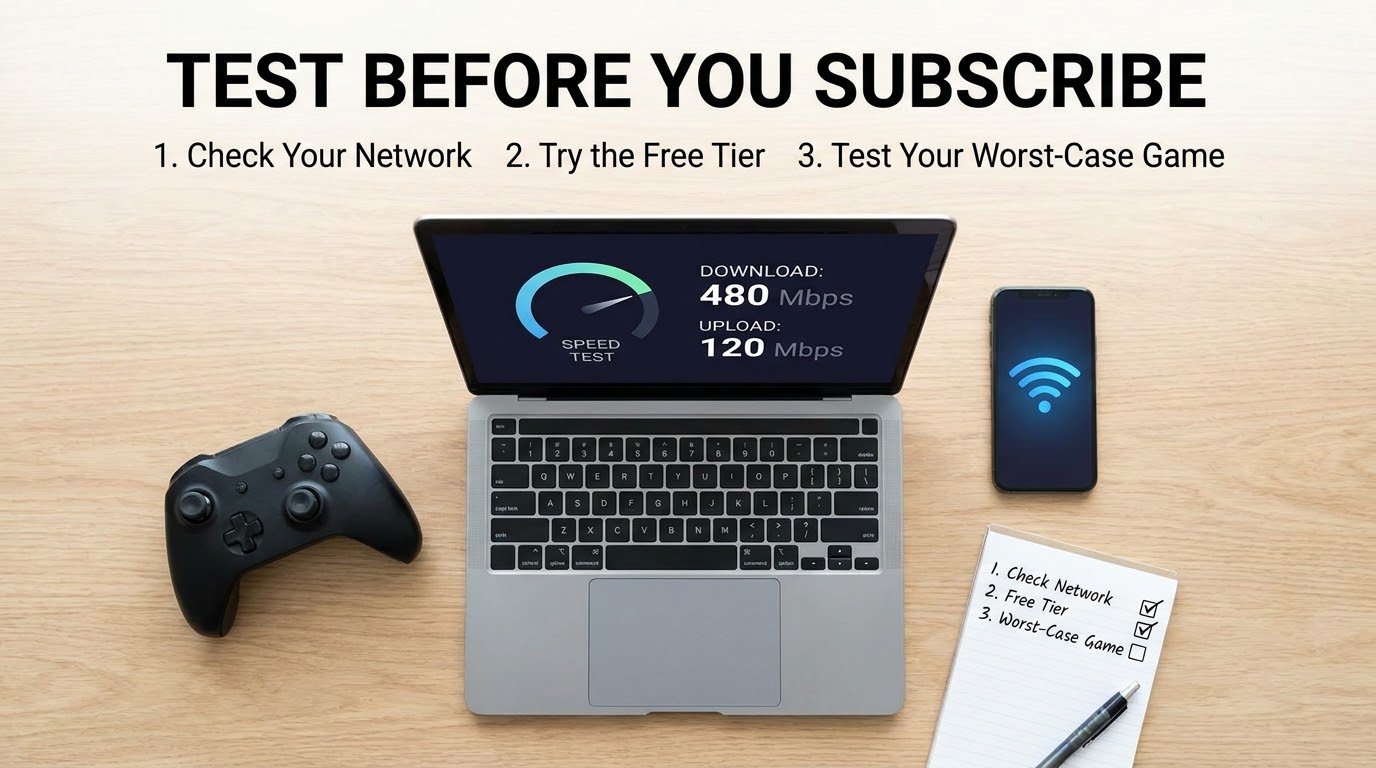
- Be honest about your network. Conduct a wired speed test and Wi-Fi speed test from the room where you’ll be gaming. Cloud gaming prioritizes stable speeds over high speeds – a steady 25 Mbps beats an inconsistent 100 Mbps.
- Begin at the free level. You already have Xbox Cloud Gaming if you’re a Game Pass Ultimate member, and GeForce Now has a practically functional free tier (think queues and one-hour play sessions).
- Which gametypes should I consider? Play your worst case game, not your best game. Try out a quick shooter or a racing game, not a slow turn-based game. If you can enjoy a twitchy game, all games will seem OK.
- See what you actually have. If most of your library is PC (via Steam or Epic), GeForce Now is the only service here that plays games you already own. Xbox Cloud and Luna are all catalog.
- Just do the annual math first, prior to shelling out on a monthly foundation. All these providers have run discounted annual promos at some stage this calendar year, verify just before you pay back full regular monthly selling price for much more than a several months.
Simple Mistakes to Make with Cloud Gaming
- And at the very least it’s assuming “fast internet” equals “good cloud gaming.” Latency and packet stability are going to be much more important than raw download speed. Wired ethernet is going to beat Wi-Fi every time.
- Buying games through a cloud storefront without looking into how the platform has performed otherwise. Think 2026, when the Luna platform will sunset its own game store, a reminder that a cloud-exclusive purchase could disappear if the company pulls up stakes.
- Neglect hourly limits. If you log a lot of gaming hours every day, the 100-hour limit on GeForce Now may be a cliff you’ll hit much sooner than you expect.
- Forcing it to perform on a poor connection. That one bad session almost made me write off Xbox Cloud Gaming. Playing it on a solid connection was a game changer.
Will it be worth it in 2026?
Me, yes, but as a service, not as a total replacement for having the hardware. During those four months without a working GPU, cloud gaming was actually a “life saver” that kept me from losing a beat on the slower or story-driven games, and was “good enough” even on the fast ones.
If I had to order these for the most of us at the moment: GeForce Now for people that have their library already on PC and are fine with handling their own sessions. Xbox Cloud Gaming for people that were already on Game Pass Ultimate and are getting this as a freebie. And for the casuals, not high-stakes people, Luna for Prime friends gaming more than gaming as a platform.
None of them completely displace a good gaming box, yet, at least for twitcher or shooter-type games. But for the average user who only games a few hours a week and doesn’t want to lay down hundreds of bucks on a GPU that may well be worn out in three years, yeah, it’s worth it. Just make sure you sign up for the service that matches your actual usage.